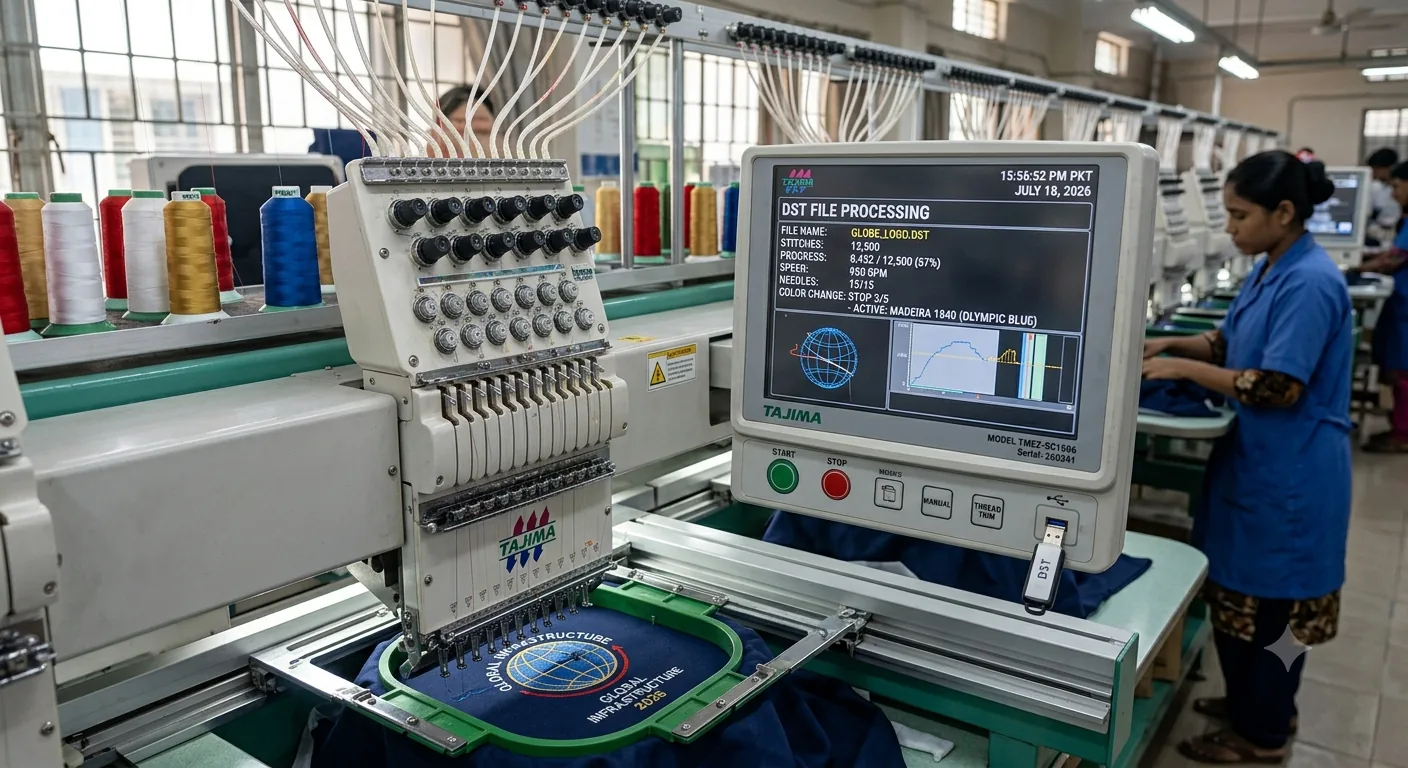
The Absolute Reality of DST Files in Commercial Embroidery
A format invented before most embroidery machine operators were born is still running the global embroidery industry in July 2026. That's not nostalgia. That's infrastructure.
DST files power commercial embroidery at a scale most people don't appreciate. Factories in Bangladesh, promotional product shops in Birmingham, custom cap decorators in Texas — they're all reading the same binary format, developed in Japan in the 1980s by Tajima Industries. Every attempt to dethrone it has failed. And if you're serious about embroidery — digitizing, running production, or just trying to get a clean stitch-out without losing your mind — you need to understand exactly why.
What Exactly Is a DST File and Where Did It Come From?
DST stands for Data Stitch Tajima. That's it. No mystery. Tajima Industries, a Japanese textile machinery company, developed the format to communicate stitch data between their digitizing systems and embroidery machines. The goal was simple: give the machine precise, unambiguous instructions. No interpretation required. Just coordinates and commands.
The Binary Architecture of DST
Here's how it works at the binary level — and I'll keep this plain. A DST file encodes stitch data as a series of short records, each 3 bytes long. Each record tells the needle to move in X and Y coordinates, in increments of 0.1mm. That's your precision. Every stitch is broken down into a grid of tiny movements.
The Core Command Vocabulary
Within those records, specific bit patterns trigger commands.
-
Jump Command: Lifts the presser foot and moves without stitching — essential for repositioning between design elements.
-
Stop / Color Change Command: Halts the machine so the operator can swap thread.
-
End Command: Tells the machine the file is finished.
That's the entire vocabulary of DST. Jump. Stitch. Stop. End.
Why Simplicity Is a Superpower
In my experience running production, people underestimate how powerful that simplicity is. There's no font rendering, no layer system, no effects engine. The file is just a list of physical movements. A machine made in 1992 and a machine made in 2023 can both read the same file because neither of them needs to do anything except move a needle to specific coordinates.
The format emerged from an era when memory was expensive and processing power was limited. Tajima engineered something lean. A typical logo — say, a 6,800-stitch left chest design — produces a DST file around 20–25 kilobytes. That's smaller than a single uncompressed photograph. And it loads instantly, even on older machine controllers that haven't been updated in a decade.
The Color Data Blindspot
One thing that trips people up: DST doesn't store colour information the way you'd expect. The file doesn't say "use Madeira 1840 Olympic Blue." It just says "stop here, operator changes thread." The colour sequence — what thread goes where — lives in the digitizing software, in a separate thread chart document, or in the operator's head. That's a deliberate limitation, not an oversight. It kept the format universal. Any machine, any thread brand, any country.
And yes, that causes real problems in 2026, which we'll get to.
How a DST File Works Inside Your Embroidery Machine During an Actual Run
You load the file. You press start. And for the next six minutes, the machine reads stitch records at a rate of around 400–600 stitches per minute, depending on your speed setting and the complexity of the design.
Real-Time Parsing and the Risk of Corruption
The machine controller parses those 3-byte records sequentially. It doesn't look ahead. It doesn't buffer the whole design. It reads the next instruction, executes it, reads the next.
That's why a corrupted byte in the middle of a DST file doesn't show up as an error message — it shows up as a physical disaster. Needles driving into the wrong spot. Thread piling up. A design that suddenly shoots three centimetres to the left of where it should be.
Thread isn't ink. A printer with a bad file produces bad output on paper. An embroidery machine with a bad file produces a broken needle, a bird's nest of thread on the underside of your garment, and potentially a bent hook if things go really wrong at 2am on a 200-piece run.
The Mechanics of Jump Stitches and Auto-Digitizing
Jump stitches matter more than beginners realise. Every time the design needs to move from one element to another — say, from the bottom of a letter to the top of the next — the machine lifts the needle, moves to the new position, and then begins stitching again.
If the jump distance is too long and there's no trim command, you get trailing threads on the surface of the garment. Some machines auto-trim jumps over a certain length; others don't. Whether a DST file includes trim commands is entirely down to how it was digitized.
This is the core problem with auto-digitizing software. I've digitized enough of these to tell you that auto-generated DST files are often full of unnecessary jumps, missing trims, and stitch sequences that make no physical sense — looping back across finished areas, creating underlay that adds bulk without adding stability. The file looks fine in the software preview. It stitches like chaos.
Managing Color Stops on the Floor
Colour stops are the other big operational consideration. A DST file with five colour changes will pause five times. The machine doesn't know what colour comes next. Your operator does — or should. If you're running a shop and you've received a DST file from a client or a freelance digitizer, you need a thread chart alongside it. Without one, you're guessing.
Corruption is more common than people admit. DST files transferred via USB sticks, email attachments, or cheap embroidery software can develop byte errors. The fix is usually re-exporting from the original digitizing file rather than trying to repair the DST itself.
DST vs PES vs JEF vs EXP — A Practical Format Comparison for Real-World Use
Right. Let's settle this properly because I see this question constantly.
| Format | Origin | Best For | Colour Handling | Software Support |
| DST | Tajima (Japan) | Commercial/industrial, any multi-head machine | Colour stops only, no colour names | Near-universal |
| PES | Brother (Japan) | Brother and Babylock home/semi-pro machines | Stores thread colour names and codes | Excellent in consumer software |
| JEF | Janome (Japan) | Janome domestic machines | Stores colour data with brand references | Moderate, Janome-specific |
| EXP | Melco (USA) | Melco commercial embroidery machines | Similar to DST — stops without names | Good in commercial environments |
| VP3 | Pfaff/Viking | Pfaff and Viking domestic machines | Rich colour and thread brand data | Good in consumer software |
Here's the thing: format choice isn't really about which is "better." It's about what your machine reads and what your software exports cleanly.
Commercial vs. Domestic Ecosystems
DST: The Commercial Standard
DST is the lingua franca of commercial embroidery. If you're sending files to a contract embroiderer, a factory, or a promotional products decorator, DST is what they expect. Full stop. Their multi-head Tajima, ZSK, or Barudan machines have been reading DST since before PES existed.
PES and JEF: The Domestic Giants
-
PES is the right format if you're running a Brother PR-series or a semi-pro machine like the Innov-ís XP3. It handles colour data beautifully and the file previews properly in Brother's own software. The problem is it won't open on a commercial Tajima without conversion, and the conversion process sometimes messes with colour stops.
-
JEF is essentially proprietary to Janome. If you own a Janome and someone sends you a DST, most Janome controllers will read it — but you lose the colour metadata. You'll need to re-enter your thread sequence manually.
EXP: The Melco Alternative
EXP is the Melco equivalent of DST — similar binary structure, similar limitations. In my experience running production on both Tajima and Melco machines, EXP files converted to DST almost always stitch clean. The formats are structurally close.
Production Decision Framework
The decision framework is simple: know your machine's native format, use that for editing, and export DST for sharing commercially. If you're a home embroiderer on a domestic machine, DST is probably not your daily driver — PES or JEF will serve you better.
The DST Problems Nobody Warns You About (And How to Actually Fix Them)
Let's talk about what goes wrong. Because it does go wrong.
1. Misaligned Stitches
Misaligned stitches are almost always a digitizing problem, not a machine problem. The file is the problem, not your machine. If your design is registering 2–3mm off between colour changes, check your tie-ins and tie-offs in the digitizing software. If you received the file from someone else, ask for the original digitizing file — not just the DST export.
2. Missing Trims and Trailing Threads
Missing trims produce trailing threads across the face of the design. Some embroiderers just trim by hand and move on. That's fine for a one-off. For a 200-piece run, it adds significant labour cost.
The fix is to go back to the digitizing software, add trim commands at every relevant jump, and re-export. In Wilcom EmbroideryStudio (which is the professional standard in 2026, though not cheap — licences start around £1,200 in the UK), you can add trims automatically to all jumps over a specified length.
3. Color Sequence Confusion
Colour sequence confusion happens constantly when DST files are shared without documentation. The file shows five stops; nobody wrote down what colour goes where. If you're a digitizer sending files to clients, creating a professional embroidery thread chart saves hours of back-and-forth.
4. Software Compatibility Issues
Software that won't open your DST file is usually a version or encoding issue.
-
Free Options: Free options that reliably open DST files include Ink/Stitch (the open-source Inkscape extension), Embroidermodder 2, and SewArt.
-
Paid Options: For a paid option, Hatch Embroidery by Wilcom offers a solid mid-range licence.
-
Quick Previews: If you're just previewing a file without editing, DST Viewer (freeware, widely available) does exactly one thing and does it well.
5. Repairing Damaged Binary Files
Repairing damaged DST files is genuinely hard because the format has no error-checking built in. A corrupted byte doesn't announce itself.
The most reliable approach is to open the file in Ink/Stitch, which renders the stitch path visually, and look for the point where the path goes obviously wrong. Delete from that point, re-digitize the affected section if you have the original artwork, and re-export. If you don't have the artwork, you're rebuilding from scratch. Save yourself the ripped-out stitches and always keep your original digitizing file alongside the DST export.
A Note on Micro-Designs (Under 4mm)
One last thing. If a design has elements smaller than 4mm — fine text, thin outlines, intricate detail — and it's producing a bad DST regardless of what you do, that's not a format problem. That's a design problem. If it won't stitch clean at 4mm, redesign it. Some logos genuinely shouldn't be embroidered. Seriously — screen print it, laser engrave it, anything else. A 2mm serif font in DST format on a fleece jacket is going to look like a fuzzy disaster no matter how good the digitizing is.
Test stitch first. Always.
The Bottom Line on DST Files
DST is not going anywhere. If you work in embroidery at any serious level — decorating, digitizing, or running production — you need to understand this format rather than just clicking export and hoping for the best. The colour limitations are real and require documentation discipline. The lack of error-checking means bad digitizing produces physical destruction, not just ugly output.
But the format's simplicity is also its superpower: universal, fast, and completely unambiguous to any machine that reads it. Learn to digitize clean DST files, pair them with proper thread charts, and you'll have fewer problems than 80% of shops out there. Start with a test stitch on scrap fabric. Every single time.
Frequently Asked Questions
How do I open a DST file on my computer?
DST files won't open in standard image or document software — you need embroidery-specific software. Free options include Ink/Stitch (an Inkscape extension available at inkstitch.org), Embroidermodder 2, and SewArt's lite version. For a paid option, Hatch Embroidery by Wilcom and Wilcom EmbroideryStudio both handle DST cleanly. If you just want to preview a file without editing, search for "DST Viewer freeware" — there are several lightweight tools that display the stitch path visually without requiring a full software licence.
Can I convert a DST file to PES or another format?
Yes, and it's usually straightforward. Software like Hatch, Wilcom, and even free tools like Ink/Stitch can export DST to PES, JEF, VP3, and other formats. The catch is colour data. DST only stores colour stop positions, not colour names or thread codes. When you convert to PES or JEF, you'll need to manually assign thread colours to each stop in the destination software. The stitch geometry transfers cleanly; the colour metadata has to be rebuilt. For commercial use, always double-check stitch count and trim positions after conversion — some software adds or removes trim commands during the export process.
Why does my DST file look different on the machine than in the software preview?
This is one of the most common frustrations in embroidery. The software preview renders stitches as smooth filled shapes; the machine executes them one needle penetration at a time on a fabric that stretches, shifts, and compresses under tension. Pull compensation — the amount you compensate for fabric distortion in your digitizing — is the biggest factor. If column stitches look fatter on the machine than in preview, your density is too high or your pull compensation is set wrong for that fabric type. Stitch direction also affects how the finished piece looks under different lighting. The preview is a planning tool, not a guarantee.
Why don't DST files store colour information properly?
By design. When Tajima developed the format, the priority was universal compatibility across machines, thread brands, and countries. Storing colour data would have required a standardised colour system — which didn't exist across manufacturers. The format says "stop here, change thread" and trusts the operator to know what comes next. It's a limitation that made the format globally successful. The solution in 2026 is still the same as it was 30 years ago: a printed or digital thread chart accompanying every DST file you send or receive.
Is DST format still relevant, or should I be using newer formats?
Completely relevant. In fact, it's still the dominant format in commercial embroidery as of 2026. Multi-head industrial machines from Tajima, Barudan, and ZSK all read DST natively. The newer proprietary formats — PES, JEF, VP3 — serve domestic and semi-professional machines well, but they don't have DST's cross-brand reach. Where newer formats win is colour handling and software integration for home embroiderers. Where DST wins is everywhere else: contract factories, promotional decorators, any environment running industrial multi-head equipment. If you're sending files commercially, DST is still the safest default.
Technical Troubleshooting: Quick Answers for Operators
Can I convert a JPG or PNG directly to DST?
No, you cannot simply "convert" or save an image file like a JPG or PNG into a DST file. Images are made of pixels, while DST files require precise binary vector paths that tell a machine needle exactly where to move, stop, and trim. To turn an artwork into a stitch file, you must go through a process called digitizing. This involves using specialized embroidery software to manually or semi-automatically map out stitch directions, densities, and underlays over the top of your image guide.
What software opens DST files for free?
If you just need to view, check, or do basic editing on a DST file without dropping heavy cash on commercial suites, you have a few solid open-source and free options:
-
Ink/Stitch: A powerful, free open-source extension for Inkscape that lets you view and edit stitch paths visually.
-
Embroidermodder 2: A lightweight, free software designed specifically for viewing and doing basic edits on various embroidery formats.
-
DST Viewer / Free Utility Tools: Widely available online freeware tools that are perfect if you just want a quick, no-nonsense preview of the stitch map before loading it onto a USB.
What's the difference between DST and PES?
The core difference comes down to the market they were built for and how they handle metadata:
-
DST (Tajima): The industrial standard. It is a lean, universal binary file used on commercial multi-head machines. It only contains physical vector paths and mechanical commands (stitch, jump, stop), completely skipping thread color data.
-
PES (Brother): A consumer and semi-professional format built for Brother and Babylock home machines. Unlike DST, PES files natively store rich metadata, including specific thread brand names, exact color codes, and design previews that display perfectly on domestic machine screens.
Why does my DST file have no color information?
This is by design, not a bug. When Tajima engineered the format in the 1980s, memory was incredibly limited, and no universal thread standard existed across global manufacturers. To keep the file size tiny (often just 20–25 KB) and completely universal across different countries, they stripped out color data entirely. The file only commands the machine to "stop here for a thread change." The responsibility of knowing which color comes next belongs entirely to the machine operator, guided by a separate printed or digital thread chart.
Do all embroidery machines read DST?
Virtually every commercial and industrial multi-head machine on the planet—whether it's a Tajima, Barudan, Happy, or ZSK—reads DST natively. It is the undisputed lingua franca of the commercial garment decoration industry. Even most modern home and semi-pro domestic machines (like Janome or Brother) can parse and run a DST file, though doing so means you will have to manually assign your thread sequence on the machine controller since the domestic unit won't be able to pull color data from the file.
OurDigitizer Editorial Team · Editorial Team
Written and reviewed by the OurDigitizer editorial team — embroidery digitizers with 12+ years of combined manual digitizing experience across DST, PES, and all major embroidery machine formats.