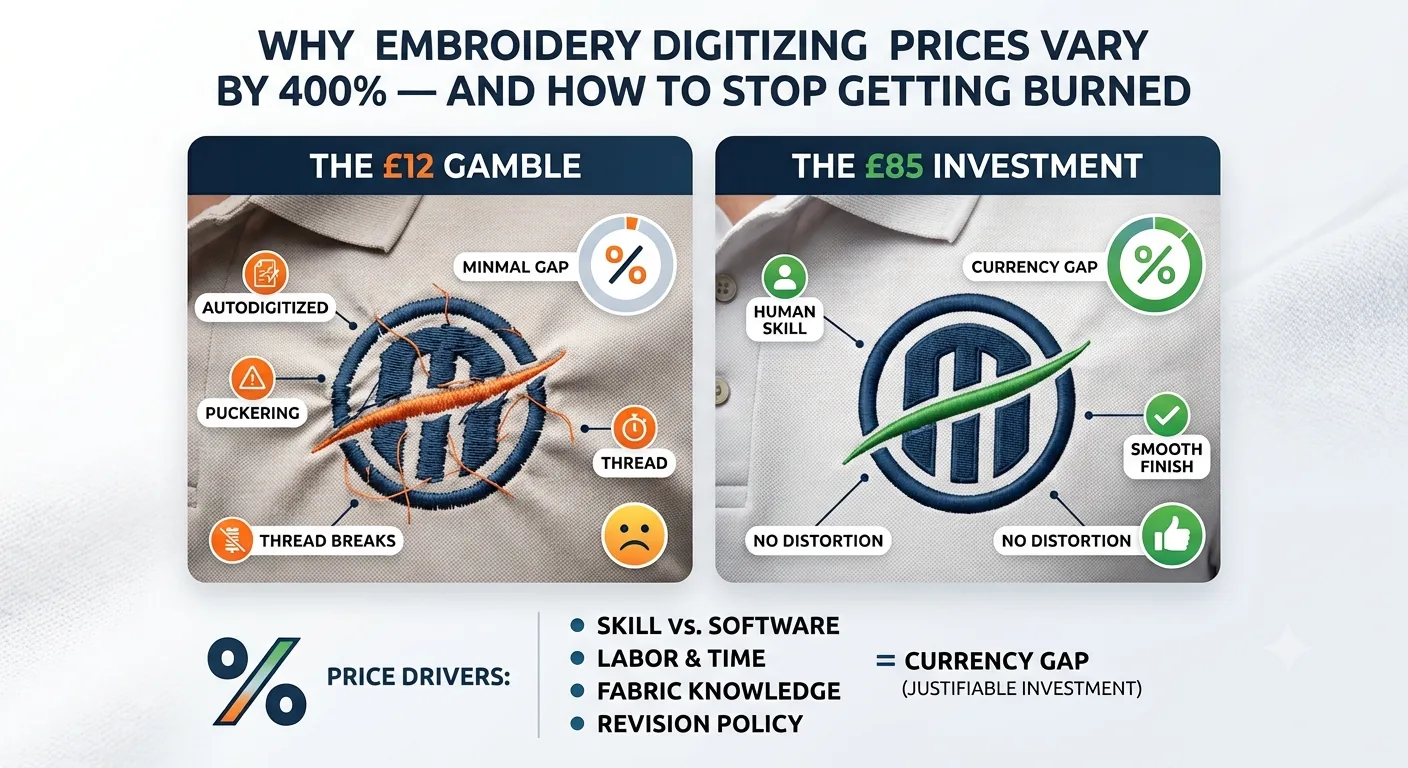
Why Embroidery Digitizing Prices Vary by 400% — And How to Stop Getting Burned
Two identical logos. One digitizing quote for £12. Another for £85. Same design, same stitch area, same end product — and you're staring at your screen wondering if the cheaper one will destroy 200 polos or if the expensive one is just daylight robbery.
That gap isn't random. It's the entire point of this article.
Embroidery digitizing pricing is genuinely confusing — not because providers are hiding something sinister, but because the variables that drive cost are invisible to anyone who hasn't sat at a digitizing workstation at 11pm fixing someone else's density disaster. I've digitized enough of these to tell you: the price difference between a £12 file and an £85 file is almost never about margin. It's about labour, skill, and whether the person building your file actually understands how thread behaves on fabric.
Let's get into real numbers. No fluff.
The Real Price Ranges — What You'll Actually Pay in 2026
Here's what the market actually looks like right now, across the UK, US, and major freelance platforms as of July 2026.
Simple Logos
Think a clean wordmark, a basic shape, or a straightforward icon with two or three colour stops — typically run between £10 and £25 ($12–$30 USD). We're talking under 5,000 stitches, minimal underlay complexity, no gradient blending, nothing trickier than a flat fill. A local embroiderer charging £15 for this isn't doing you a favour — that's the correct price.
Medium Complexity Designs
A company logo with multiple elements, a crest with some detail, or a sports badge with layering — lands between £25 and £60 ($30–$75 USD). Stitch count typically sits in the 5,000–15,000 range. This is where most commercial work lives. A polo run for a hotel chain, a workwear chest logo, a school badge.
Highly Detailed or Large-Format Designs
Full back jacket art, photorealistic faces, fine lettering under 4mm, 3D puff work — starts at £60 and can comfortably hit £150 or beyond ($75–$185+ USD). I've built files for detailed wildlife illustrations that came in at 45,000+ stitches. The digitizing on those takes hours. The £150 is not a rip-off.
Pricing Models: Per-Stitch vs Flat-Fee
Some services price per 1,000 stitches — typically £0.80 to £1.50 per thousand, sometimes lower offshore. Others charge flat rates per design. Neither model is inherently better, but per-stitch pricing rewards you on simple jobs and punishes you on complex ones. Flat-fee models are usually better value once you get past 12,000 stitches.
And here's the bit most buyers miss entirely: digitizing is a one-time cost. Once the file exists and stitches clean, you own it. Every subsequent run costs you nothing extra in digitizing. That £85 file across 500 shirts costs you 17 pence per unit in digitizing. The £12 file that causes thread breaks and puckering on those same 500 shirts is the expensive one.
Note: Prices mentioned are estimates based on market research and may vary significantly depending on design complexity, provider location, turnaround time, and service type. Always request a custom quote.
What Actually Drives the Cost Up (Or Down)
This is where it gets useful. Because you can control more of this than you think.
Key Factors Influencing the Final Price
1. Stitch Count
Stitch count is the biggest single driver. More stitches means more digitizing time. A 3,000-stitch hat logo takes 20–30 minutes to build properly. A 25,000-stitch jacket back might take three to four hours. The maths is straightforward.
2. Design Complexity
Complexity is separate from stitch count. A circle with one colour and clean edges is simple even at 8,000 stitches. A company crest with thin outlines, small text, and colour blending is complex at 6,000 stitches. Complexity is about the decisions the digitizer has to make — stitch direction changes, underlay selection, pull compensation adjustments on curves, sequence logic. That's where skill costs money.
3. Turnaround Time
Turnaround time adds cost fast. Standard delivery — 24 to 48 hours — is priced into most quotes. Rush fees for same-day work often add 30–50% on top. In my experience running production, the 2am panic order for "tomorrow morning" always costs more than it should have. Plan your jobs.
4. File Format Requirements
File format requirements can add fees, particularly if you need multiple formats for different machines — a DST for your Tajima, a PES for a Brother, a VP3 for a Pfaff. Some providers include format conversion. Others charge per format. Ask upfront.
5. Number of Colour Stops
Number of colour stops matters on commercial runs. Each stop slows production. A 12-colour design on a 15-needle machine is manageable. On a 6-needle machine it requires manual intervention. Digitizers who understand production will build files to minimise stops without destroying the design. That skill costs more. It saves you hours at the frame.
What You Can Actually Control to Save Money
-
Simplify the artwork before you submit it.
-
Convert gradients to flat colours.
-
Accept that 3mm text won't embroider — [LINK: small text digitizing guide] — and let it go.
-
Don't rush orders you planned three weeks ago.
-
Send the right file type: a clean vector (AI or EPS) costs less to work from than a low-resolution JPEG that needs tracing first.
Freelancers vs Auto-Software vs Professional Studios
| Criteria | Freelance Digitizer | Auto-Digitizing Software | Professional Studio |
| Typical Cost | £8–£45 per design | £15–£40/month subscription | £30–£120 per design |
| Quality Ceiling | Variable — skill-dependent | Low–medium (simple designs only) | High — consistent |
| Turnaround | 12–48 hours typically | Instant | 24–72 hours |
| Best For | One-off jobs, budget buyers | Testing concepts, very simple art | Commercial runs, critical logos |
| Revision Risk | High on cheaper listings | N/A — you adjust it yourself | Low — revisions usually included |
| Format Options | Most formats available | Limited, platform-dependent | All major formats |
| Human Judgement | Yes — quality varies | No | Yes — experienced team |
1. Freelance Digitizers
Freelancers on platforms like Fiverr or Upwork range from genuinely talented professionals to people using auto-software and reselling the output at a markup. The pricing tells you something but not everything. A £10 Fiverr listing from someone with 400 five-star reviews might be excellent. A £10 listing from an account created last month is a gamble. Look at their sample files, not just their ratings. Ask them what underlay they'd use on a cap design — if they can't answer, move on.
2. Auto-Digitizing Tools
Auto-digitizing tools — and there are several on the market in 2026, including online services and desktop software with AI-assisted conversion — are genuinely useful for one specific scenario: you have a simple, high-contrast design, you need it fast, and you're not doing a critical production run.
I've seen auto-digitized files that were actually passable on clean geometric logos. I've also seen them generate 47 unnecessary colour stops on a two-colour design. The technology has improved. It still doesn't understand thread.
Thread isn't ink. Auto-software doesn't know that satin stitches over 8mm will fall apart on a stretchy polo. It doesn't compensate for the way a left chest position pulls differently from a hat. It doesn't sequence for minimum jump stitches. And it absolutely won't tell you when a design simply shouldn't be embroidered at all. [LINK: when to screen print instead of embroider]
3. Professional Studios
Professional studios — whether that's an established digitizing company or an embroidery shop with in-house digitizing — are where the money is well spent for anything going into commercial production. You're paying for accountability, consistency across colourways and placements, and someone who'll flag a problem before it becomes 200 ruined shirts.
How to Avoid Hidden Costs and Get the Best Value From Any Digitizing Quote
The cheapest quote almost never stays cheap. Here's how to protect yourself before you pay a penny.
5 Critical Rules for Smart Buying
Rule 1: Always Ask for a Stitch Count Estimate
Any competent digitizer can give you a rough stitch count before they start work. If they won't — or can't — that's a flag. Stitch count tells you what you're actually buying and lets you compare quotes meaningfully. A £20 quote for a 15,000-stitch file is better value than a £15 quote for an 8,000-stitch file with poor construction.
Rule 2: Request a Sew-Out Before Approving a New Design
Test stitch first. Always. A sew-out on scrap fabric costs you one thread cone and ten minutes. Skipping it on a new file costs you a bin full of shirts. Any professional provider should offer this — or at minimum, send you a sew-out image from their end before you approve production.
Rule 3: Understand the Revision Policy Upfront
Some services include two rounds of revisions in the base price. Others charge per edit — sometimes £5–£15 per change. If your artwork is likely to evolve (client logos often do), get a provider with inclusive revisions or a clear policy in writing.
Rule 4: Watch for Per-Format Charges
You might receive a quote for a DST file, then discover the VP3 version for your second machine costs extra. Ask upfront: "Does this price cover all file formats I need?" Get it confirmed.
Rule 5: Know When Paying More Upfront Actually Saves You Money
A properly digitized file for a 500-unit run at £75 is 15p per unit in digitizing cost. A poor file that causes thread breaks every 800 stitches adds operator time, wasted thread, and rejects. In my experience running production, a bad file on a long commercial run easily costs more in wasted time than the entire digitizing budget.
Before You Pay Any Digitizing Provider, Ask These Questions:
-
What's the estimated stitch count for my design?
-
What formats are included in the price?
-
What's your revision policy?
-
Can I see a sew-out before I approve production?
-
How do you handle pull compensation on curved surfaces like caps?
-
What's your turnaround time, and what are your rush fees?
[LINK: how to brief a digitizer properly]
Save yourself the ripped-out stitches. Five minutes of due diligence before you commission a file is worth more than any discount.
The Verdict: Stop Shopping on Price, Start Shopping on Value
If you're ordering digitizing for any commercial embroidery run — uniforms, merch, branded workwear — don't base your decision on headline price. Base it on stitch count per pound, revision policy, and evidence of quality. The file is the problem, not your machine.
A well-built £60 file will run 10,000 times without drama. A badly built £12 file will cost you that in wasted materials inside the first run. Get the stitch count upfront, request a sew-out, understand what you're buying. That's how you stop getting burned on embroidery digitizing — regardless of what any quote says.
Frequently Asked Questions
How much does embroidery digitizing cost for a simple logo?
For a clean, simple logo — flat colours, no fine detail, under 5,000 stitches — you're typically looking at £10–£25 ($12–$30 USD) as of 2026. That's for professional digitizing from a human, not auto-software. If someone quotes you £3 for this, they're either using auto-software and reselling it, or they're new and haven't priced their labour correctly. Always ask for a stitch count and request a sew-out on any file you haven't used before in production.
Is there a difference between a one-time digitizing fee and a per-order fee?
Yes, and it matters significantly to your long-run cost. A digitizing fee is a one-time charge to create the embroidery file. Once built and approved, that file is yours — you pay nothing more to use it repeatedly. Some lower-cost services, particularly online embroidery print-on-demand platforms, bundle a "digitizing fee" into each order, which sounds cheap per unit but means you never actually own the file. If you're doing repeat orders, always own your file outright.
Can I use free or cheap auto-digitizing software instead of paying a professional?
For very simple, high-contrast designs — a bold monogram, a basic geometric shape — auto-digitizing tools have improved enough to be usable in 2026. But they have real limits: they don't understand fabric behaviour, they don't apply proper pull compensation, they often over-complicate underlay, and they routinely fail on anything with fine detail or text under 6mm. Use auto-tools for concept testing or non-critical personal projects. For anything going into commercial production, pay a human.
Why does the same design cost different amounts from different providers?
Because you're not buying the same thing. Provider A in the UK with 15 years of commercial digitizing experience, inclusive revisions, and a sew-out guarantee is not the same service as Provider B using offshore auto-software reselling. Beyond that, geography affects pricing — digitizers in Western Europe and North America typically charge more than those in South and Southeast Asia, and that reflects labour costs, not necessarily quality.
What's the most common reason embroidery digitizing goes wrong?
In my experience running production, it's almost always one of three things:
-
The artwork provided was too low-resolution or too complex for the intended size.
-
Pull compensation wasn't set correctly for the garment, causing gaps after the fabric relaxes.
-
Underlay was either missing or wrong, leading to design shifts or puckering on stretchy fabrics at scale.
The fix for all three is a proper sew-out test before production starts. Test stitch first. Always.
How much does it cost to digitize a logo for embroidery?
In 2026, the cost to digitize a standard logo ranges from £10 to £60 ($12–$75 USD) depending heavily on complexity and stitch count. A simple text or geometric logo under 5,000 stitches usually sits at the lower end (£10–£25), while complex corporate crests or jacket backs with high density can easily exceed £60 to £150+.
Why do digitizing prices vary so much between companies?
The price gap reflects differences in labor, experience, and the tools used. Lower quotes often come from automated software or inexperienced freelancers who don't account for fabric pull and push. Higher quotes come from professional studios that manually path the design, set correct underlays for specific fabrics, offer guaranteed sew-outs, and ensure the file runs smoothly on commercial machines without constantly breaking threads.
Is cheap $1–2 digitizing worth it?
Almost never for commercial production. Quotes at this price point are generated using unedited auto-digitizing AI software. While they might look okay on a computer screen, they ignore how thread behaves on real fabric—leading to high stitch counts, unnecessary color stops, bird-nesting, and puckered fabric. Saving a few pounds on the file can easily cost you hundreds in ruined garments and wasted machine time.
Do I pay per format or is one price for all formats?
This depends entirely on your provider's policy. Many professional studios include standard machine formats (like DST, PES, EXP) in their flat fee if requested upfront. However, some budget platforms or freelance listings charge an extra fee for every additional format conversion. It is critical to confirm that all required formats for your specific machines are included before you accept a quote.
Are revisions charged extra?
Reputable digitizing studios typically include 1 to 2 rounds of minor revisions (such as sizing adjustments or minor density tweaks) within their initial price. However, if the underlying artwork changes completely after the work has started, or if you are working with a low-cost provider who charges a fee per edit, revisions can cost anywhere from £5 to £15 per change. Always check the revision policy before handing over money.
OurDigitizer Editorial Team · Editorial Team
Written and reviewed by the OurDigitizer editorial team — embroidery digitizers with 12+ years of combined manual digitizing experience across DST, PES, and all major embroidery machine formats.